
Planning to implement Salesforce but unsure how much it will cost?
A Salesforce implementation can cost anywhere from $10,000 to $300,000+, excluding Salesforce subscription fees. The final investment depends on the size and complexity of your project, the Salesforce products you choose, the number of users, data migration requirements, integrations, customization, automation, training, and ongoing support.
For a basic small-business setup, implementation may cost around $10,000–$30,000. A mid-market implementation involving data migration, automation, and integrations may range from $30,000–$150,000, while complex enterprise or multi-cloud projects can exceed $150,000–$500,000+.
This guide breaks down Salesforce implementation costs, license fees, consulting expenses, timelines, hidden costs, and practical ways to control your overall investment.
How Much Does Salesforce Implementation Cost?
There is no single Salesforce implementation price. Your cost depends on your business requirements, project scope, number of users, data volume, integrations, customization, and Salesforce products.
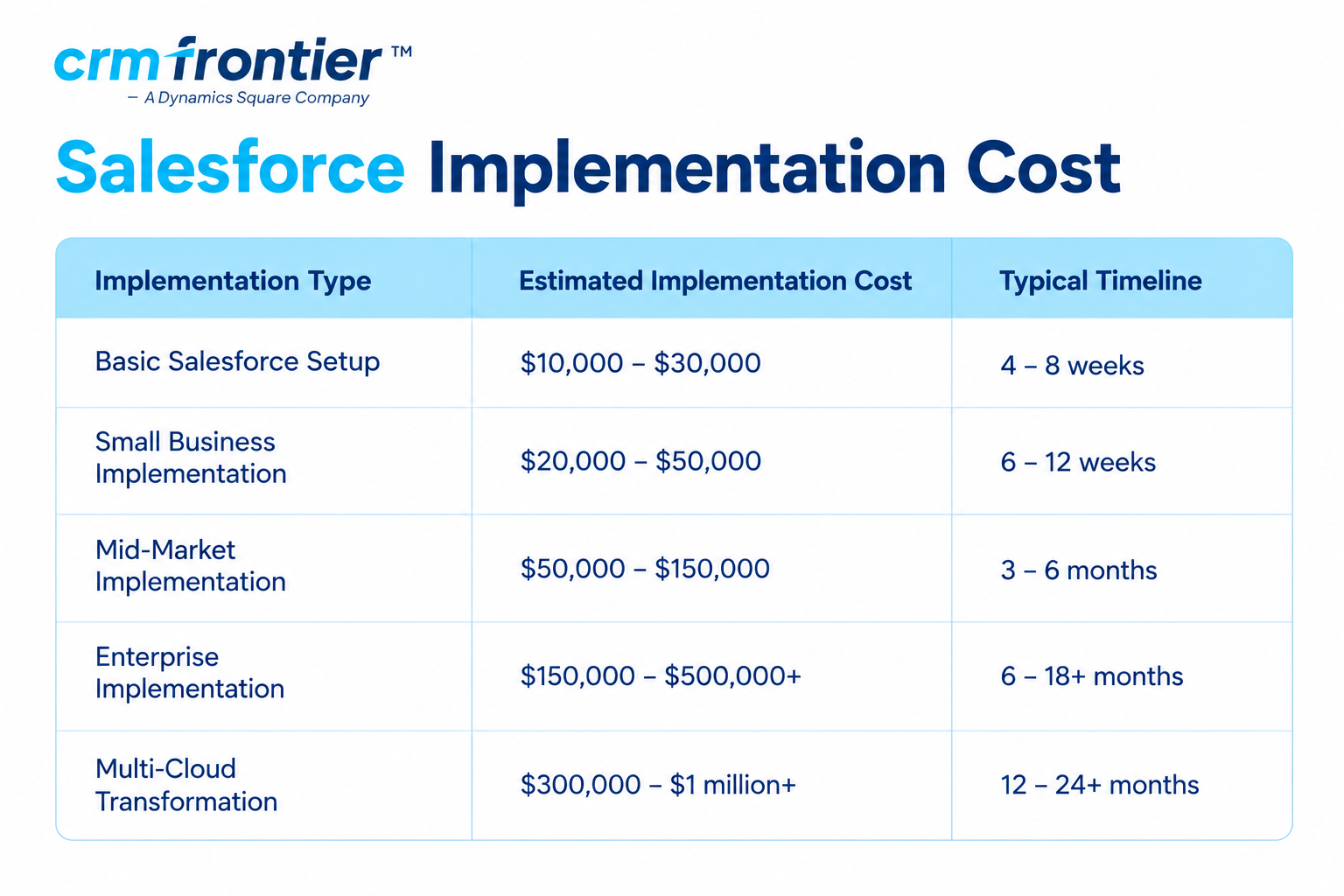
These figures are planning estimates, not fixed Salesforce prices. Your actual implementation cost may vary based on your Salesforce partner, location, products, data quality, integration requirements, custom development, and support needs.
Salesforce License Cost vs. Implementation CostOne of the most important things to understand is that Salesforce license fees and implementation costs are separate expenses.
Salesforce subscription fees provide access to Salesforce products and features. Implementation costs cover the professional services required to plan, configure, customize, migrate, integrate, test, launch, and support your Salesforce environment.
Your first-year Salesforce budget may include:
- Salesforce subscriptions
- Discovery and requirements analysis
- Solution architecture
- Configuration and customization
- Custom development
- Data cleansing and migration
- Integrations and APIs
- Testing and deployment
- User training
- Change management
- Post-launch support
- Additional storage and add-ons
Considering all of these costs upfront can help you create a more realistic Salesforce budget.
Salesforce Implementation Cost by Business Size
Salesforce Implementation for Small Businesses
A small business typically needs core sales functionality, basic reporting, email integration, and a relatively simple data migration.
Common requirements include:
- Lead and opportunity management
- Account and contact management
- Basic sales processes
- Standard reports and dashboards
- Email or calendar integration
- Migration from spreadsheets or a basic CRM
- Administrator and end-user training
Estimated implementation cost: $10,000–$40,000, excluding Salesforce licenses.
Small businesses can often control implementation costs by using standard Salesforce functionality and launching the platform in one focused phase.
Salesforce Implementation for Mid-Market Businesses
Growing organizations often require more advanced automation, multiple user roles, integrations, custom objects, and detailed reporting.
Typical requirements include:
- Sales and service workflows
- Approval processes
- Custom objects and fields
- Lead assignment and automation
- ERP or accounting integration
- Marketing or telephony integration
- Data cleansing and migration
- Role-based security
- User training and adoption support
Estimated implementation cost: $50,000–$150,000, excluding Salesforce licenses.
Salesforce Implementation for Enterprise Businesses
Enterprise implementations are generally more complex because they may involve multiple departments, regions, Salesforce products, external systems, security requirements, and compliance processes.
Typical requirements include:
- Multiple Salesforce clouds
- Complex sharing and security rules
- High-volume data migration
- Multiple integrations
- Custom applications and code
- Regional business processes
- Advanced reporting and analytics
- Formal testing and governance
- Extensive change management
- Ongoing managed services
Estimated implementation cost: $150,000–$500,000+, excluding Salesforce licenses.
Salesforce Licensing and Subscription Costs
Salesforce licensing is commonly priced per user, per month, although some Salesforce products use different pricing models.
The total subscription cost depends on factors such as the Salesforce product, edition, number and type of users, billing arrangement, country, add-ons, and negotiated contract.
The Salesforce Sales Cloud pricing information in this guide includes the following publicly displayed editions:
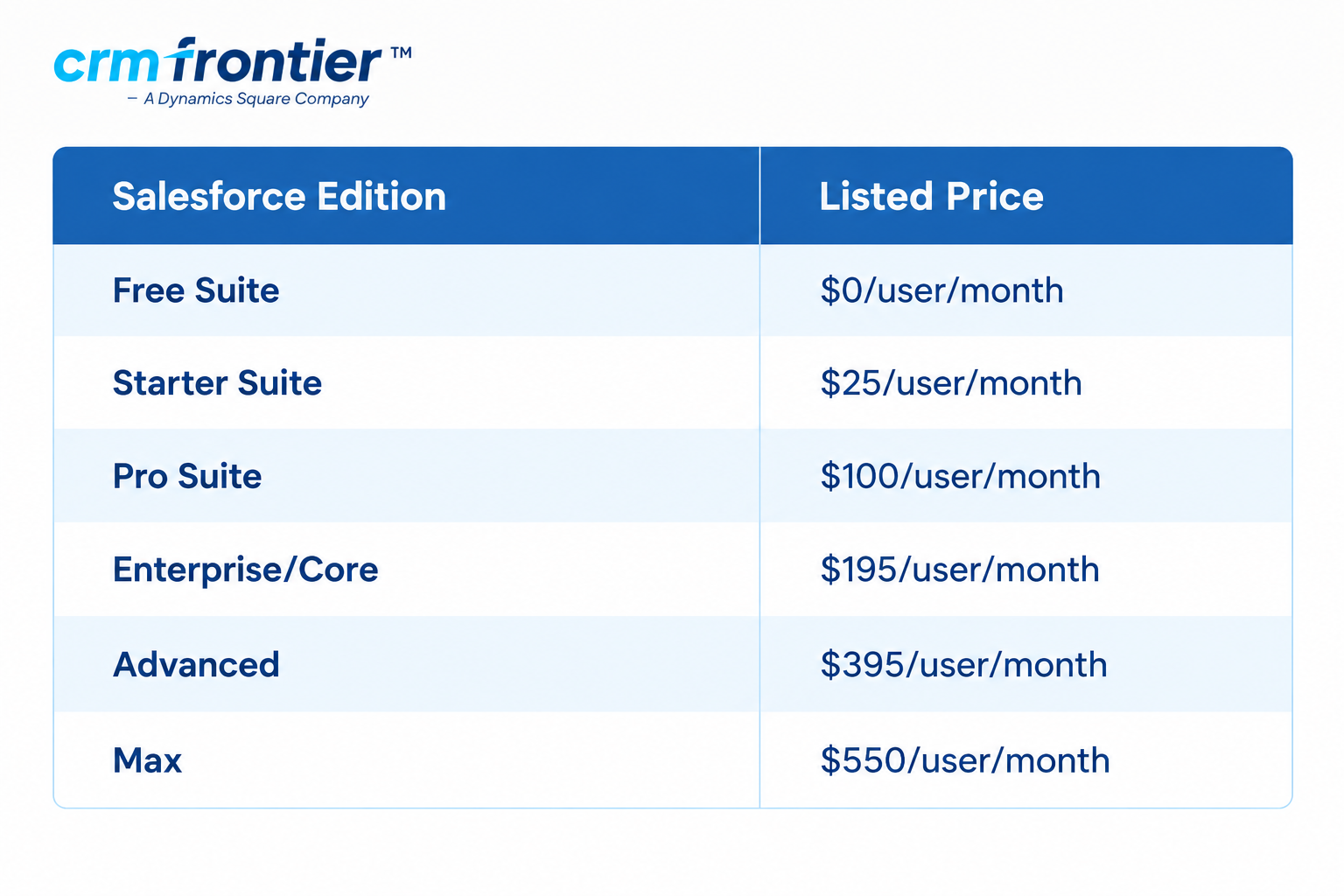
Pricing can vary by product, region, billing arrangement, and additional features. Always verify the latest pricing directly with Salesforce before making a purchasing decision.
Salesforce Product Cost Categories
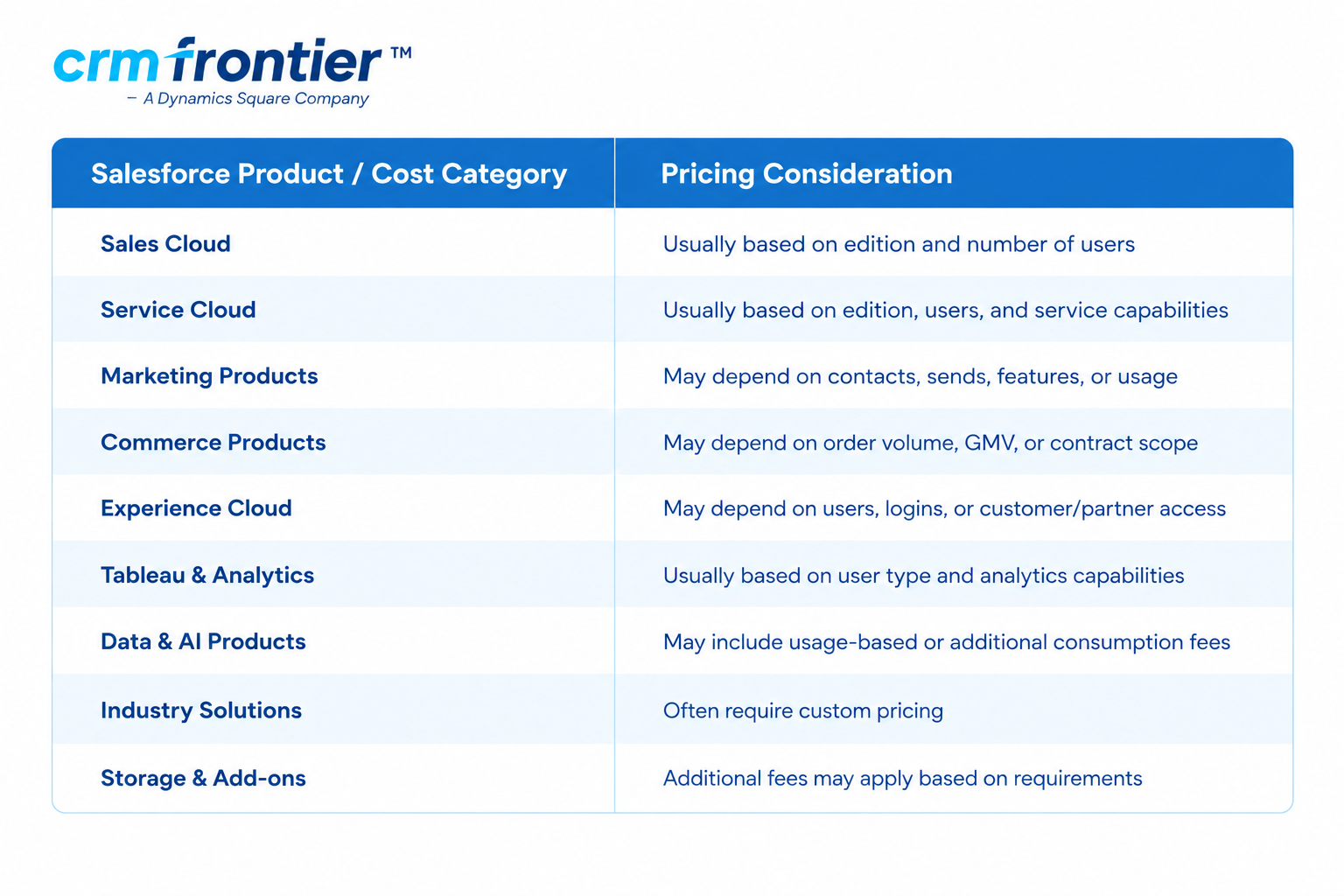
What to Check Before Selecting a Salesforce Plan
Before choosing a Salesforce subscription, check:
- Whether pricing is monthly or annual
- Whether the price is per user or usage-based
- Which features are included
- Whether automation is included
- Whether API access is included
- Whether sandbox access is included
- Whether support is included
- Whether storage limits meet your requirements
- Whether AI and data capabilities require additional products
- Whether the quoted price applies to your country and currency
What Is Included in a Salesforce Implementation?
A professional Salesforce implementation typically involves several stages, from discovery and solution design to migration, testing, deployment, and training.
1. Discovery and Requirements Analysis
The implementation team evaluates your current systems, business processes, users, goals, and challenges.
This phase may include:
- Stakeholder interviews
- Business-process mapping
- Current-system assessment
- Requirements gathering
- Future-state process design
- Project scope definition
- Requirement prioritization
2. Salesforce Solution Architecture
The solution architect determines how Salesforce should support your business processes and future growth.
This may include:
- Salesforce products and editions
- Data model
- Security model
- Automation strategy
- Integration architecture
- Reporting strategy
- Scalability requirements
- Technical risks and dependencies
3. Configuration and Customization
Configuration uses Salesforce's standard capabilities, while customization may involve additional development.
Common activities include:
- Custom objects and fields
- Page layouts
- Record types
- Validation rules
- Flows and approvals
- Assignment rules
- Reports and dashboards
- Apex development
- Lightning Web Components
- Custom user interfaces
Whenever possible, using standard Salesforce functionality can help reduce development, testing, and maintenance costs.
4. Salesforce Data Migration
Data migration is often one of the most important parts of an implementation.
It may involve:
- Source-system analysis
- Data extraction
- Duplicate removal
- Data cleansing
- Field mapping
- Data transformation
- Data validation
- Migration rehearsals
- Data reconciliation
- Final cutover
Poor data quality can increase implementation costs because data may need to be cleaned, standardized, deduplicated, and validated before it can be migrated.
5. Salesforce Integration
Salesforce may need to connect with other business systems, including:
- ERP systems
- Accounting platforms
- Marketing automation tools
- Customer support systems
- Telephony platforms
- Payment applications
- E-commerce platforms
- Data warehouses
- Identity and access-management systems
Every salesforce integration can add design, development, testing, security, monitoring, and maintenance requirements.
6. Testing and Deployment
Testing helps ensure that Salesforce works as expected before users begin working in the production environment.
Testing may include:
- Unit testing
- System testing
- Integration testing
- User acceptance testing
- Security testing
- Performance testing
- Regression testing
- Data-validation testing
- Cutover testing
7. Training and Change Management
A technically successful Salesforce implementation still needs user adoption.
Training may be provided for:
- Salesforce administrators
- Sales teams
- Customer-service teams
- Managers
- Executives
- Reporting and dashboard users
Training should also cover new business processes and data-quality responsibilities.
Factors That Affect Salesforce Implementation Cost
Salesforce Products and Editions
The Salesforce products and editions you select affect both subscription costs and implementation effort.
A basic Sales Cloud implementation will generally require less work than a project involving Sales Cloud, Service Cloud, marketing products, analytics, industry functionality, and AI capabilities.
Number of Users
More users can increase licensing, training, testing, security, and change-management requirements.
However, user count alone does not determine implementation cost. A 20-user organization with complex integrations may require more implementation work than a 100-user organization using mostly standard Salesforce features.
Project Complexity
Complexity can increase when your project includes:
- Multiple departments
- Multiple Salesforce clouds
- Multiple countries or regions
- Complex sales processes
- Advanced approvals
- Custom development
- Complex security requirements
- High-volume data
- Multiple integrations
- Strict compliance requirements
Customization
Customization is a major cost driver.
Custom objects, complex automation, Apex, Lightning Web Components, and custom applications require additional design, development, testing, documentation, and maintenance.
A practical approach is to use standard Salesforce functionality wherever possible and introduce custom development only when it provides clear business value.
Data Quality and Migration Volume
The number of records is not the only factor that matters. Data structure and data quality are equally important.
Poor-quality data may require:
- Cleansing
- Deduplication
- Transformation
- Validation
- Reconciliation
Preparing your data early can reduce migration delays and rework.
Integration Requirements
Each integration introduces additional technical requirements.
A pre-built connector may reduce development time, but it still needs configuration, data mapping, security review, testing, and ongoing monitoring.
Security and Compliance
Organizations in regulated industries may require additional security and compliance capabilities, including:
- Advanced access controls
- Field-level security
- Audit trails
- Encryption
- Data-retention policies
- Compliance reporting
- Additional testing and documentation
Training and User Adoption
User adoption directly affects the value you receive from your Salesforce investment.
If employees struggle to understand new processes or workflows, additional training, support, customization, or process redesign may be required.
Salesforce Implementation Cost Breakdown
The following percentages can be used as an initial planning framework:
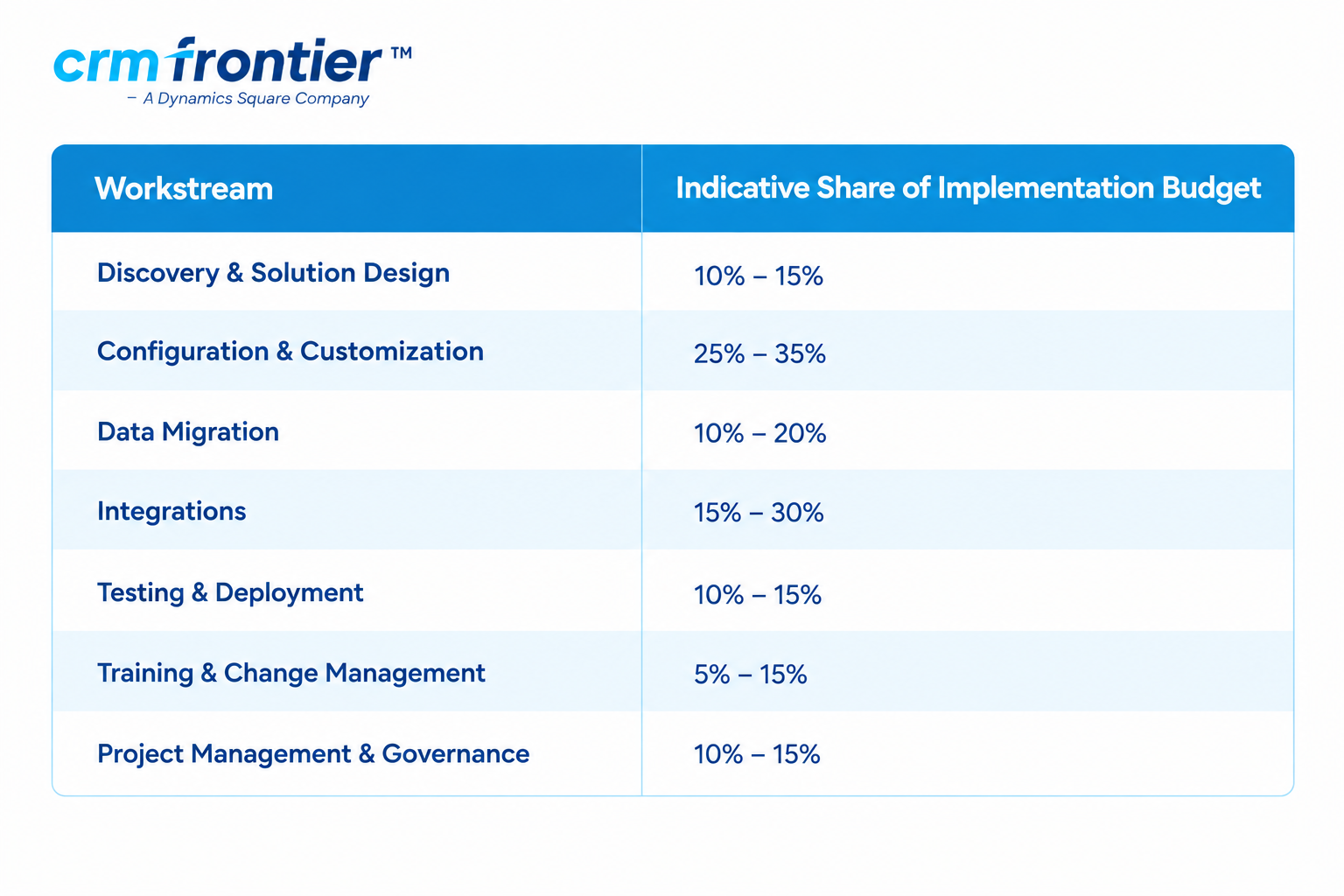
These percentages are indicative rather than fixed. An integration-heavy project may allocate more budget to integrations, while a simpler implementation may require a larger proportion for training and adoption.
Salesforce Consultant and Partner Costs
Salesforce consulting costs vary based on location, experience, specialization, engagement model, and project complexity.
Public market benchmarks commonly place experienced Salesforce consulting rates around $100–$300+ per hour. Senior architects and enterprise specialists may charge more, while offshore delivery teams may have lower hourly rates.
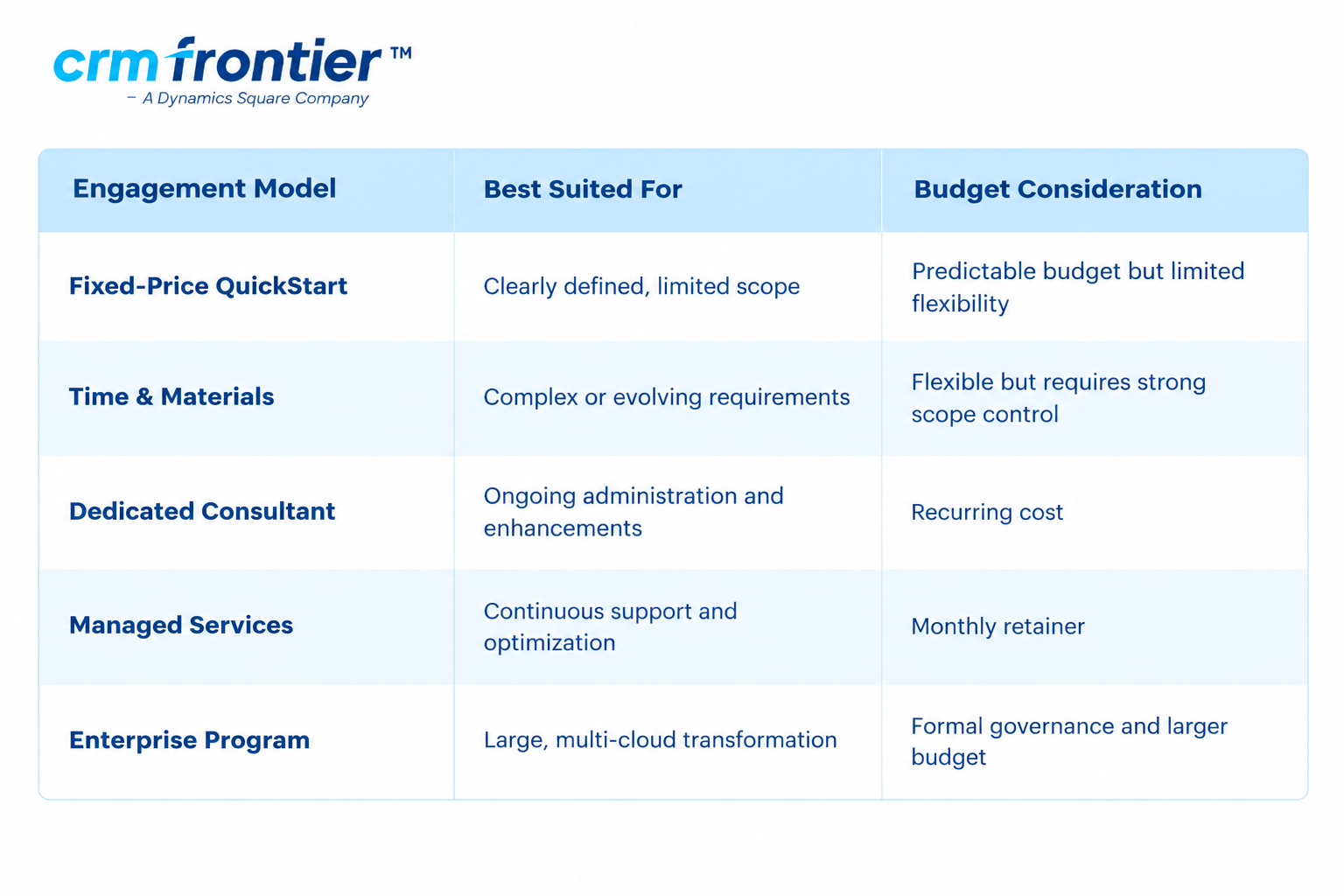
When comparing Salesforce partners, don't look at hourly rates alone. Review the complete scope, deliverables, assumptions, timeline, team experience, methodology, support model, and expected total cost.
Hidden Salesforce Costs to Plan For
Some Salesforce costs may not be obvious during the initial planning stage.
Consider budgeting for:
- Additional Salesforce licenses
- Sandboxes and testing environments
- Data storage
- File storage
- API or integration middleware
- Data-quality tools
- Backup and recovery tools
- Additional analytics capabilities
- AI or data-product usage
- Change requests
- Post-launch support
- Internal employee time
- Ongoing Salesforce administration
- Future enhancements
- Security reviews
- Compliance documentation
A 10%–20% contingency can also be considered for unexpected requirements, scope changes, and technical issues discovered during discovery or migration.
Salesforce Implementation Cost Examples
Example 1: Small Sales Team
A 15-user company needs:
- Lead and opportunity management
- Account and contact management
- Standard reports
- Email integration
- Spreadsheet data migration
- Basic training
Estimated implementation budget: $15,000–$35,000, excluding Salesforce licenses.
Example 2: Growing Organization
A 100-user organization needs:
- Sales and service workflows
- Custom objects
- Approval automation
- ERP integration
- Data cleansing and migration
- Role-based dashboards
- User training
Estimated implementation budget: $60,000–$140,000, excluding Salesforce licenses.
Example 3: Enterprise Rollout
A global company needs:
- Multiple Salesforce clouds
- Several external-system integrations
- Complex security rules
- High-volume data migration
- Regional processes
- Custom development
- Formal governance and change management
Estimated implementation budget: $200,000–$500,000+, excluding Salesforce licenses.
How to Reduce Salesforce Implementation Costs
Choose the Right Salesforce Products
Start with the Salesforce products and capabilities that directly support your current business goals. Avoid paying for functionality that your organization does not yet need.
Define a Minimum Viable Implementation
Separate requirements into:
- Must-have features
- Important future features
- Optional enhancements
Launch the most valuable capabilities first, then expand as users adopt the platform.
Use Standard Salesforce Functionality
Standard objects, fields, flows, reports, dashboards, and security features can often reduce development and maintenance requirements.
Use custom development when standard Salesforce functionality cannot meet an important business requirement.
Clean Your Data Before Migration
Start data profiling and cleansing early. Removing duplicates and resolving data-quality issues before migration can reduce delays, rework, and testing problems.
Use Pre-Built Integrations Where Appropriate
Pre-built connectors can reduce development effort. However, evaluate their limitations, security model, data mapping, support, and subscription costs before selecting one.
Consider a Phased Rollout
A phased implementation can reduce the initial investment and allow your team to learn from the first release.
For example:
Phase 1: Core sales or service processes
Phase 2: Integrations and advanced automation
Phase 3: Analytics, AI, additional clouds, and optimization
Assign an Internal Product Owner
A dedicated decision-maker can help reduce delays, conflicting requirements, and unnecessary scope changes.
Compare Salesforce Partner Proposals Carefully
Ask each Salesforce implementation partner to clearly define:
- Scope
- Deliverables
- Timeline
- Assumptions
- Exclusions
- Team structure
- Testing responsibilities
- Training approach
- Support period
- Change-request process
- Payment milestones
Use Salesforce Trailhead for Supplemental Learning
Salesforce Trailhead provides learning resources for users and administrators.
However, learning resources do not replace specialist services for architecture, data migration, integrations, testing, security design, or complex implementations.
Salesforce Implementation Timeline
The implementation timeline depends on project scope and complexity.
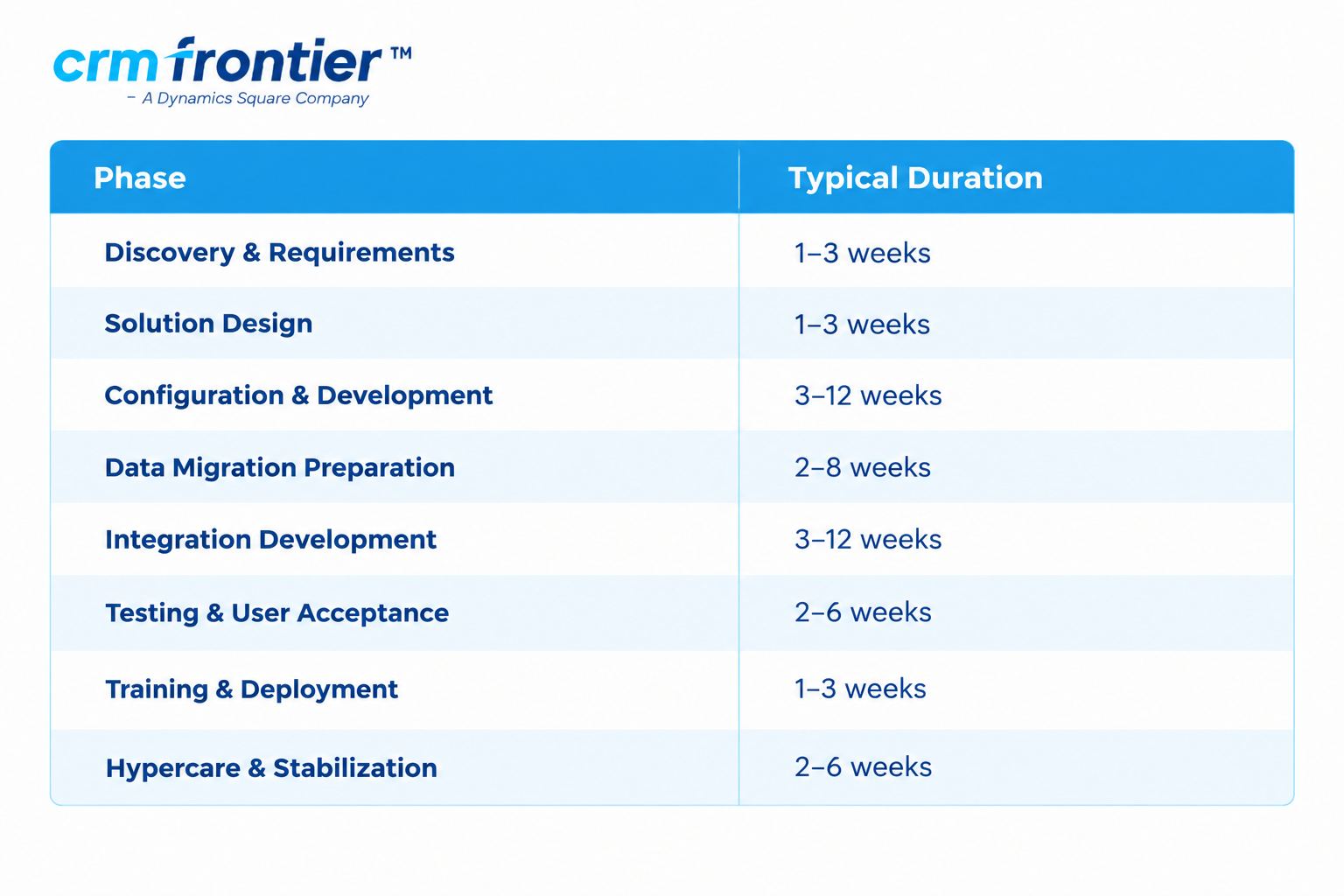
These phases may overlap.
A simple Salesforce implementation may be completed in four to eight weeks, while a large enterprise rollout can take 12 months or longer.
How to Measure Salesforce ROI
Salesforce ROI should be measured against business outcomes, not just subscription costs.
Useful metrics include:
- Lead-response time
- Sales-cycle length
- Forecast accuracy
- Win rate
- Service-resolution time
- Reduction in manual work
- Data completeness
- User adoption
- Reporting time
- Revenue influenced by improved customer processes
You can use the following formula:
ROI = (Financial Benefit − Total Salesforce Cost) ÷ Total Salesforce Cost × 100
Remember to include the complete Salesforce investment when calculating ROI, including subscriptions, implementation services, migration, integrations, training, support, internal employee time, administration, and add-ons.
Frequently Asked Questions
How much does Salesforce implementation cost?
Salesforce implementation may cost approximately $10,000–$30,000 for a basic setup, $30,000–$150,000 for a mid-market project, and $150,000–$500,000+ for a complex enterprise implementation. Salesforce license fees are generally separate.
Is Salesforce implementation more expensive than the license?
It can be. For complex projects, data migration, integrations, custom development, training, and support can represent a significant portion of the first-year Salesforce investment.
How long does Salesforce implementation take?
A basic implementation may take four to eight weeks. Mid-market projects often take three to six months, while multi-cloud enterprise programs may take six to 18 months or longer.
What increases Salesforce implementation costs?
Major cost drivers include custom development, integrations, poor data quality, large migration volumes, multiple Salesforce products, complex security, automation, compliance requirements, global rollouts, and change management.
Can Salesforce be implemented in phases?
Yes. A phased rollout can reduce the initial investment and allow your organization to launch core functionality before adding advanced automation, integrations, analytics, AI, or additional Salesforce products.
Should I hire a Salesforce consultant?
A Salesforce implementation partner can be useful when your project involves integrations, data migration, custom automation, complex security, multiple teams, or significant process changes. An internal administrator may be sufficient for a basic setup.
Does Salesforce offer free implementation?
Salesforce provides documentation, learning resources, and product guidance. However, implementation activities such as configuration, migration, integration, testing, and training generally require internal resources or professional consulting support.
Why Choose CRM Frontier for Salesforce Implementation?
Salesforce can be a significant investment, but careful planning can help organizations control costs and build a system that supports measurable business outcomes.
CRM Frontier helps organizations plan, configure, customize, integrate, migrate, and optimize Salesforce based on their business requirements.
Our approach begins with an assessment of your processes, data, users, integrations, and business goals. With more than 10 years of CRM experience, CRM Frontier supports organizations across industries with Salesforce consulting and implementation services.
Our Salesforce services include:
- Salesforce consulting
- Salesforce implementation
- Salesforce customization
- Salesforce data migration
- Salesforce integration
- Salesforce automation
- Salesforce training
- Salesforce managed services
- Salesforce optimization
Get a Salesforce Implementation Estimate
Every Salesforce project is different. Your expected cost depends on factors such as your Salesforce products, number of users, current systems, integrations, data volume, customization requirements, and target go-live date.
CRM Frontier can help you understand your likely project scope, timeline, implementation approach, and budget range.
Contact CRM Frontier today to discuss your Salesforce implementation requirements.